Unlocking AutoCAD 2026.1: Boost Collaboration and Productivity with Enhanced Features
- Oct 27, 2025
- 3 min read
Updated: Oct 30, 2025
Written by AutoDesk Team
AutoCAD is thrilled to announce that AutoCAD 2026.1 and AutoCAD LT 2026.1 are now available, packed with exciting new features and enhancements designed to make your design experience more productive and collaborative. Autodesk, constantly strive to innovate and improve tools based on user feedback, and these new 2026.1 releases are a testament to this commitment.
There are several significant updates to features that you’ll want to check out. If you’re already eager to dive into these new capabilities that AutoCAD has to offer, go ahead and open the Autodesk Access application to start your update while you read this post.
Note: The 2026.1 update is automatically included in every new installation of AutoCAD 2026.
Multi-User Markup – Desktop Integration

One of the most significant enhancements in AutoCAD 2026.1 is the integration of Multi-User Markups within the desktop application, which allows multiple users to add markups to a single design to facilitate seamless collaboration. You can now access and incorporate markups created in AutoCAD on the web into your desktop workspace, ensuring that feedback and collaborative efforts are consolidated in one place. With AutoCAD 2026.1, these markups, made with the advanced yet easy-to-use markup tools now available via AutoCAD on the web, can now be accessed directly in the desktop application.
What is Multi-user markups?
Multi-user markups allow you to streamline collaboration on Autodesk Docs projects by giving you the ability to collect and share feedback directly on drawings using intuitive Autodesk Docs markup tools. Although these markup tools are originally from Autodesk Docs, they are now available on AutoCAD on the web and accessible through the desktop application.
In addition, the new SHARE command allows you to share DWGs stored on Docs for markup in web only, furthering the level of control you have in collaborative environments. TRACE layers enable users to markup files that continuously sync, providing flexibility for teams to review and markup changes together. This collaborative approach enables all feedback to be captured and addressed, leading to better project outcomes.
This integration means that collaboration will now be much more productive, making it easier to incorporate changes and suggestions from multiple stakeholders, all while working within the familiar desktop environment.
Merging “Learning” and “My Insights” Tab in App Home

In AutoCAD 2026.1, the “Learning” and “My Insights” tabs have been combined into one convenient section in the App Home interface. This update eliminates the need to navigate between separate tabs, consolidating all the tutorials, tips, and personalized insights into a single, easy-to-access location.
By merging these tabs, it provides a more cohesive and efficient experience. The streamlined layout simplifies navigation and reduces clutter, allowing you to quickly find valuable resources and customized insights tailored to your unique usage patterns. Whether you’re a seasoned professional or new to AutoCAD, this enhancement combines all efficiency and learning tools into one place, ensuring that you have a one-stop shop for boosting your AutoCAD efficiency.
Smart Blocks UX Refinements
Smart Blocks remains one of the most popular features in AutoCAD. With the 2026.1 update, we’ve made significant UX refinements to enhance its functionality. These refinements include an improved design and user interface, allowing you to create and manage Smart Blocks with greater ease.
Detection Progress Indicator
This new feature gives real-time updates on the status of block detection processes, allowing you to easily monitor and anticipate the completion of block detection operations. This enhancement increases transparency, enabling a more fluent and controlled workflow so you’ll know where you’re at in the process.

Tooltips for Detection Actions
New tooltips provide quick and informative hints regarding various detection tasks, enabling you to understand functionalities right in the product without needing to refer to external documentation. The addition of these tooltips contributes to reducing the learning curve, making Smart Blocks more approachable for both new and experienced users.
New Option for Layer Assignment
AutoCAD 2026.1 introduces a new option to assign block definition objects directly to layer 0. This enhancement simplifies the layer assignment process, ensuring that block definitions are organized efficiently and consistently. By assigning objects to layer 0, you can benefit from enhanced control over visibility and plot styles, leading to cleaner and more manageable drawings.
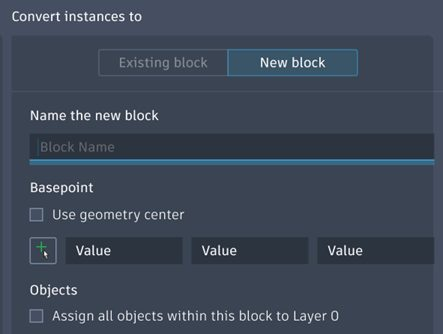
These enhancements are focused on usability and performance, ensuring that you can work more efficiently. The refined UX makes it simpler to manipulate and deploy Smart Blocks within your designs, ultimately saving you time and reducing the effort needed for repetitive tasks.


Comments